Blender Animation Suite 2.0

BEAT PRO

The ultimate viewport animation suite designed natively for Blender 5.0+. Sculpt organic spacing, lock tangents, isolate parent pivots on the fly, and speed up your workflow with clean, intuitive animator controls.

BEAT RIG PICKER v2.0 // Blender 5.0+ Collection Color Pipeline ● Bidirectional selection active (Pose Mode)
COLLECTIONS
Blender Context:
Pose Bone Selection
Blender 5.0 Custom Bone Palettes
FK_Arm.L
Green
IK_Leg.R
Yellow
Spine_Root
Blue
BONE PALETTE CUSTOM SYNC
Select a control bone to focus selection.

Designed by Animators, for Animators

Skip the technical setup. Click on any module console below to see how BEAT 2.0 optimizes your timing, spacing, and posing workflows.

Timeline Navigation Timeline Navigation
Transforms & Offset Transforms & Offset
Tangents & Interp Tangents & Interp
Tweens & Sliders Tweens & Sliders
Viewport Pipelines Viewport Pipelines

Timeline Navigation

Fluidly jump between workspaces to focus on your curves, key timing, and frames.

3 templates
To Graph To Graph Editor
Shift + F1

Instantly switches your layout to the Graph Editor. Perfect for jumping in to polish a spacing pop on a joint without breaking your creative posing flow.

To Dope To Dope Sheet
Shift + F12

Switches to the Dope Sheet Editor to slide full character pose keys, edit cycle ranges, and block timing patterns collectively.

To Timeline To Timeline
Default View

Returns the view to the clean, minimal timeline bar. Clears screen real estate so you can focus entirely on real-time viewport playback.

Keyframe Nudges & Animation Offsets

Shift coordinates, mirror poses, and slide timelines organically while keeping underlying curves safe.

Speed & Timing
Copy Paste Copy / Paste & Paste Flipped
Ctrl+C / Ctrl+V / Shift+V

Saves keyframe selections. "Paste Flipped" automatically mirrors pose values onto opposite limbs (Left-to-Right swaps) based on character naming rules.

Anim Offset Relative Slide (Anim Offset)
Non-destructive

Offsets selected animation ranges vertically relative to their current curves. Add height to a jump or rotate a spine offset without breaking or rebuilding your keys.

Mirror Precision Mirroring
Value / Time

Mirror Value: Vertically flips selected keys (inverts arcs/directions) around a specific pose height.
Mirror Time: Horizontally reverses keys to play animations backward.

Reset All Reset Transforms
Normal / Ctrl+Click

Zeroes out location, rotation, or scale values to return to rest poses. Ctrl + Click snaps key values to match evaluated frame coordinates instantly.

Move Left Nudge / Timeline Push
Timing slide

Slide keyframes horizontally. Running this without a selection shifts all downstream keys collectivelyβ€”creating timing gaps in your scene automatically.

GX Snapping Translate (GX / GY)
Whole Frames

Slides keys along timeline (X) or value height (Y) axes. Locks coordinates to whole integers so your keyframes never end up on subframes.

Tangents & Splines

Clean up curve clutter and shape interpolation transitions between your poses.

Spline Control
Bezier Interpolation Modes
Linear / Bezier / Constant

Swaps spacing styles: use **Constant** for blockout passes, **Linear** for constant mechanical actions, and **Bezier** for smooth ease-in/outs.

Auto Handle Slopes
Aligned / Vector / Free

Controls keyframe handles. Swap to **Vector** to create sharp bounces, **Aligned** to keep keys smooth, or **Free** to edit left and right weights independently.

Snap Horizontal Flat Tangents (Snap Horizontal)
Zero Slope

Instantly flattens selected keyframe handles. Zeroes out curve slopes to lock easing holds at the peaks and valleys of movements.

Sel Left Handles View Toggle
Declutter Curves

Hides curve handles except on selected keys. Declutters the editor screen completely when animating complex multi-axis rigs.

Tweens, Spacing Sliders & Overlaps

Sculpt pose breakdowns, spacing weights, and follow-through overlaps interactively using modal sliders.

12 Spacing Sliders
Scale Handles Tension Slider (Scale Handles)
Drag Mouse

Scales tangent handle lengths. Slide left/right to extend or shorten ease weight symmetrically without altering curve slopes.

Clean Keys Smart Key Decimator
P (Peak Protect) / Drag

Interactive key decimator slider. Filter out redundant keys while drag-scrubbing. Press **P** to lock extreme peaks and valleys, protecting performance accents.

Cascade Procedural Overlaps (Cascade Offset)
Drag to Lag

Offsets selected channel timings relative to one another. Drag the mouse to generate clean, procedural overlapping follow-through waves down tails, ears, or spines.

12 Integrated Tween Styles
Blend Default Blend Default

Blends selected keys back toward their original rest pose values (T-pose or zero base).

Blend Neighbor Blend Neighbor

Smooths out spacing pops by blending keys toward adjacent key values.

Blend Offset Blend Offset

Offsets curve values non-destructively, preserving spacing details.

Blend to Ease Blend to Ease

Blends current curves into a clean, ease-in or ease-out spacing spline profile.

Breakdown Breakdown

Skews timing and poses proportionally between your previous and next key poses.

Ease Ease

Applies dynamic spacing acceleration or deceleration relative to neighboring frames.

Match Slope Match Slope

Adjusts tangent handles to match the average path slope of adjacent keys.

Push Pull Push Pull

Exaggerates (Push) or dampens (Pull) the height peaks of selected curves to adjust motion amplitude.

Scale Average Scale Average

Scales curve keys vertically relative to their average height, keeping overall centers intact.

Scale Neighbor Scale Neighbor

Scales selected keyframe values relative to neighboring reference keys.

Shear Keys Shear Keys

Shears timing ranges diagonally to slide timing offsets on pose peaks.

Time Offset Time Offset

Horizontal time shifter sliding selected F-curves left or right across frame ranges.

Viewport Pipelines & Tool Panels

Production panels designed to accelerate layout reviews, pose library management, and character selections.

BEAT Sidebar Suites
Rig Picker Floating Rig Picker
View UI πŸ‘οΈ

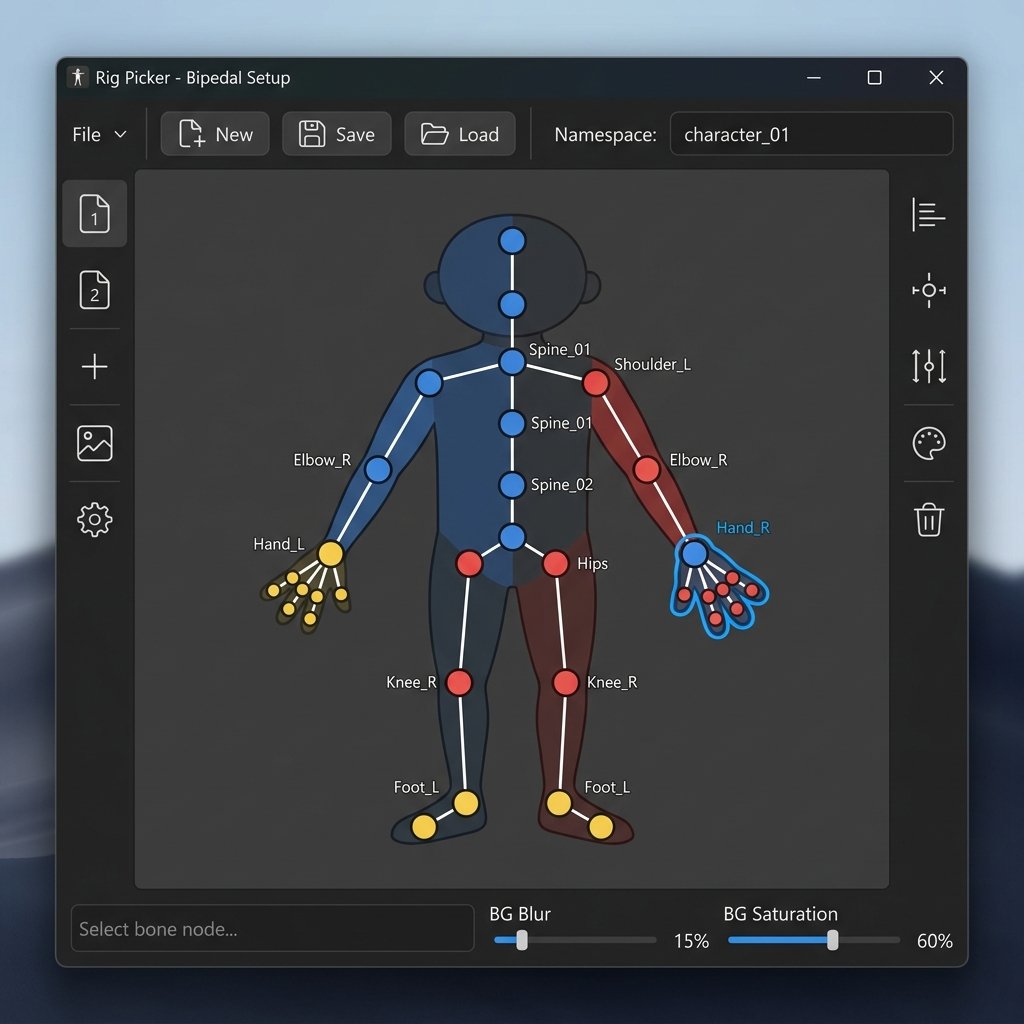
An interactive 2D node map representing your character controllers. Click graphic nodes instead of searching in cluttered 3D viewports. Supports namespace switching, mirroring, and custom bipedal layouts.

Studio Library Studio Pose Library
View UI πŸ‘οΈ

Save and organize character poses and cycles. Apply them back symmetrically or use the interactive slider to blend a saved pose into your character from 0% to 100%.

Selection Sets Selection Sets
View UI πŸ‘οΈ

Save custom groups of bones, models, or vertex selections. Toggle visibility locks, isolate channels, and copy sets symmetrically to mirror controllers.

Temp Locators Temp Locators
View UI πŸ‘οΈ

Isolate parent spaces. Pin your character's hand to a table by temporarily baking the coordinates to world-space helpers. Animate in clean axes, then bake edits back down.

Camera Tools Camera Locking Suite
View UI πŸ‘οΈ

Manage cameras directly from the viewport sidebar. Slide lens focal lengths, lock transforms, and overlay thirds grids to compose your shots.

Playblast Playblast Viewport Renderer
Real-time Review

Bake viewports into high-performance preview videos. Features subframe rendering (motion blur emulation), container encodes (MP4/WebM), and metadata stamps (focal length, frame count).

BEAT 2.0 Interface Screenshot
BEAT v2.0 Sidebar β€” Floating Rig Picker Console

Trusted by Animators Worldwide

Real feedback from BEAT users who rely on it every day in Blender production.

Tom

Maya β†’ Blender transition
β˜…β˜…β˜…β˜…β˜…

This is a great app which has really helped me adjust from using Maya. It brings across many much needed tools that have really sped up and simplified my workflow. On top of that, the developer added an extra feature to it so it was more accustomed to my workflow, which was really nice of him. Really friendly guy who cares, and continues to give support even after purchase.

Ruslan

Long-time Maya animator
β˜…β˜…β˜…β˜…β˜…

I've been animating in Maya for years and it was really hard for me to switch from Maya to Blender until I purchased the Beat addon. That made my life different and I highly recommend it for everyone! That is definitely my favorite addon for Blender!

Anett

Daily animation workflow
β˜…β˜…β˜…β˜…β˜…

I absolutely love this add-on and use it all the time for my animations! It's an incredibly useful tool that has improved my workflow tremendously.

Ibrahim Fadl Ibrahim

β˜…β˜…β˜…β˜…β˜…

Fantastic .. all what you need in one powerful package .. very well done.

Rogerio Souza Britto

β˜…β˜…β˜…β˜…β˜…

Excellent tool, it's helping me a lot.

maddoju ramesh

β˜…β˜…β˜…β˜…β˜…

lovely addon. thank you for this..

Choose Your License Tier

Select the option that matches your workflow and pipeline requirements

Feature Freelance License Studio License
Seat Allocation Deployment type and seat locking rules
1 seat (single-user perpetual) 1 baseline studio seat (Studio perpetual tier)
Core Deliverables Product environment features and toolsets
Advanced timeline tools, UI icons, mirror/X-axis keyframes Centralized deployment, shared preferences, multi-user environment stability
Commercial Terms Usage rights and team transfer policies
Cleared for freelance, commercial work, and indie games Built for boutique studios and internal animation departments
Volume Licensing Multi-seat scale options
βœ— Not Available Scalable multi-seat options available via direct inquiry
Updates & Support Customer service priority and updates
Lifetime major Blender release compatibility updates βœ“ Priority Support Direct developer line for version updates & hotfixes
FREELANCE LIFETIME LICENSE

BEAT PRO FOR BLENDER

$50.00
  • βœ“ 1 Single-User Seat (Perpetual)
  • βœ“ Complete Advanced Timeline Toolkit
  • βœ“ Mirror & X-Axis Keyframe Operations
  • βœ“ Custom UI Iconography Skins
  • βœ“ Commercial Production Cleared
  • βœ“ Major Blender Release Compatibility

Requires Blender 5.0+ or newer (Windows/Linux/macOS).